
From a discrepancy to a completed correction
A laptop passed on or a signature missing? Connect insight to review, a TOPdesk change and verification of the completed correction.


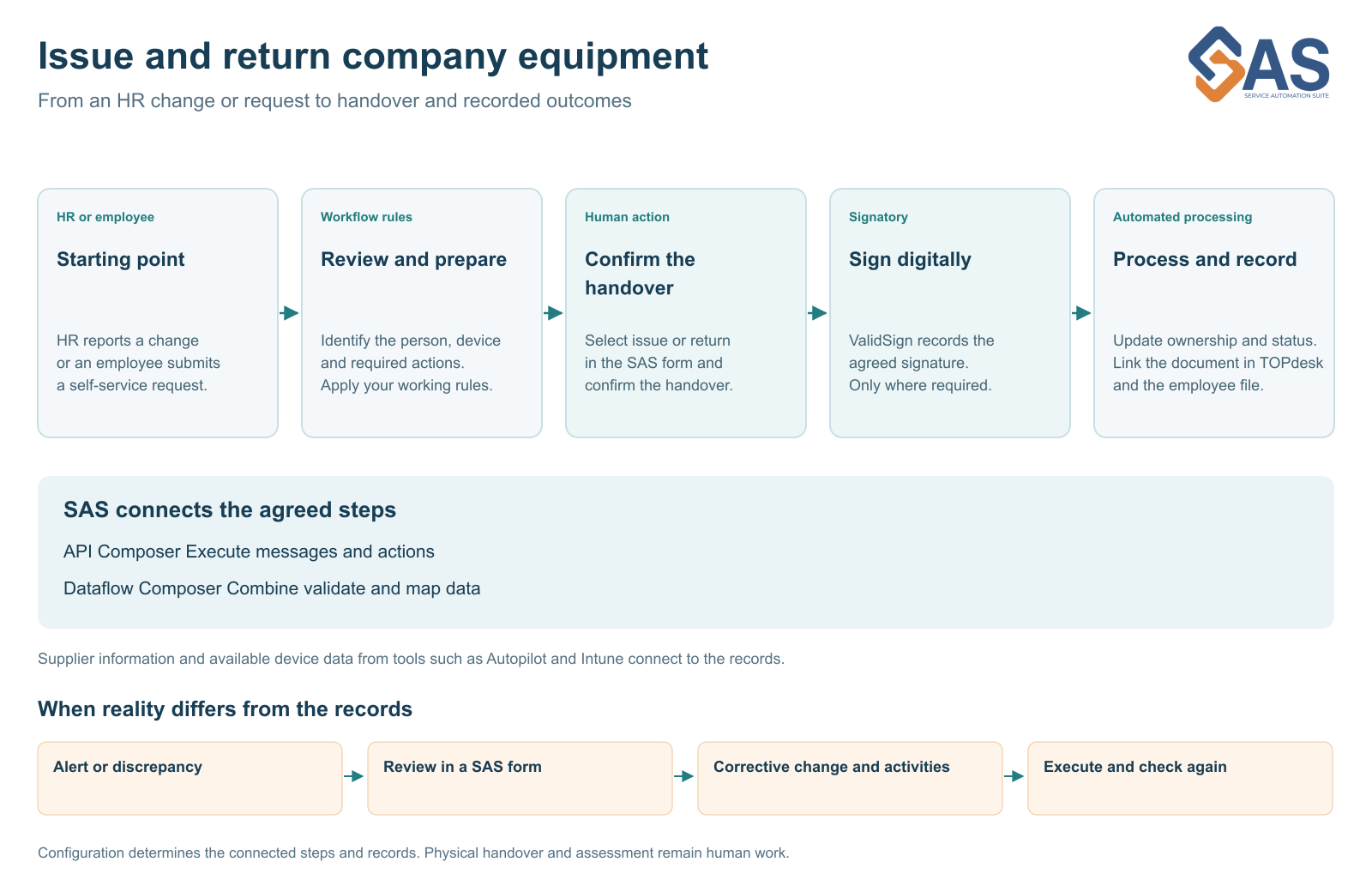
The process is agreed and the records are in place. Someone nevertheless passes on a phone without reporting it. Or a laptop is issued while its receipt is still unsigned. Building a connection does not make these situations disappear.
Insight starts the follow-up
With Service Automation Suite, you can compare relevant records and surface differences. Examples include an unexpected user, a missing signature or equipment not recorded as returned when someone leaves. You then need to establish what happened and who can assess it.
Not every difference needs an immediate automatic correction. An intentional exception, delayed source or incorrect record requires a different response. Agree which information a decision needs and who makes that decision.
Review through an interactive form
An interactive Service Automation Suite form can bring the relevant information and possible next actions together. The responsible person checks the situation and selects an appropriate correction. The configured workflow can then create a TOPdesk change with activities, for example.
Assessment stays with the appropriate person, while agreed execution need not become another collection of separate administration tasks. Insight connects to work that is actually assigned and carried out.
Turn the decision into a correction
Suppose a laptop has moved to another employee. Following review, its relationship needs updating, a new receipt may need signing in ValidSign, and the document must reach the correct record. The workflow can coordinate those steps and record their outcome.
If equipment is missing, the next step may instead be a task to arrange its return. Correcting a record and physically recovering equipment are different results. Track both.
Check the correction too
A started activity is not a completed solution. Report which actions ran, which document was processed and what still needs attention. Failed processing needs an owner and an appropriate next action.
This makes the approach easier to hand over. A colleague can see what was established, which decision was made and what followed. Reuse the checks and activities for the next discrepancy without obscuring responsibility.
Read more about TOPdesk in your workflow and control and coordination.
Who has what and on what basis
Mesdag focuses on exactly this question: why does someone have access or equipment, which policy applies and who approved an exception? Its customer story describes the relationship between employee information, assignments and execution in TOPdesk. Read about Mesdag’s approach.
See this workflow in a demo
We can demonstrate this approach. Show us where your team retypes information or chases outstanding actions. Together, we can choose a first step that fits your environment.
More about this workflow
Explore the next part of the workflow · Read another perspective
Solutions, scenarios and technology.
Continue directly from the context of this story.

More from the same context.
Less administration and more control of equipment
Build time savings, ownership and evidence into your equipment workflow. Start with one measurable step and build further together.
Asset records need to match reality
Supplier data, Intune and TOPdesk each tell part of the story. Service Automation Suite connects that information to ownership, issue and return using clear source rules.
One workflow for HR changes and self service
A new employee, role change or TOPdesk self-service request can trigger the same workflow. Connect HR, IT and facilities to issue, return and signing.
A signature that moves the workflow forward
Connect ValidSign digital signing to equipment handover, return and filing in TOPdesk and HR, so a signed document does not remain a disconnected attachment.
Recognize this in your organization?
Discuss your process, scenario or control chain with us. You do not need to know the answer yet.