


Scope4mation · Service Automation Suite
All components
A request moves across systems and teams. Service Automation Suite components connect the data, carry out the work and show what still needs attention.
Connect
Put data where it belongs.
Keep your existing applications. Service Automation Suite brings their data together and makes it useful for the next step.
API ComposerConfigure API calls, authentication and parameters. Retrieve data, write changes back and use the response in the next step.
How you use it
- Connect your applications
We configure calls, authentication and input for the systems you already use. - Bring results back into the process
A response from one system becomes useful input for the next step. - Integrations that can evolve
The exchange remains understandable and reusable when a process or application changes.
Its place in your process
API Composer provides the connection. Data Flow Composer helps when data must first be combined or transformed; Automation Composer can then carry out the agreed action.
A practical example
A request requires a ValidSign signature. Configure the call, supply the required data and retain the returned reference for subsequent steps. The workflow uses confirmed signing status to process a document or start a review or recovery action. The request and the business decision are separate, reusable building blocks.
Data Flow ComposerCompare sources, relate records and filter or transform values. Give each follow-up action the right context.
How you use it
- Combine sources
Retrieve the data you need and connect records across systems. - Handle differences deliberately
Compare source and destination, filter irrelevant data and identify exceptions before making changes. - Prepare data for use
Transform values and structure so the next step can use understandable data.
Its place in your process
Data Flow Composer prepares the information. API Composer retrieves or writes data; Automation Composer can start a follow-up action based on the result.
A practical example
Compare devices in Intune with assets in TOPdesk. Missing or inconsistent records become visible; then decide which updates can run automatically and which need attention first.
Endpoint ComposerCreate a managed entry point for applications and partners. Define who may submit, what input is required and which response follows.
How you use it
- Clear input requirements
Define the data needed so the next step does not start with detective work. - Controlled access
Configure how each consumer or partner may use the entry point. - Give a useful response
The submitting party learns whether its request was received and processed.
Its place in your process
Endpoint Composer provides the entry point. Other Service Automation Suite components can then enrich data, update systems and organise follow-up.
A practical example
Combine TOPdesk service data with central customer relationships and prepare the agreed selection in a Service Automation Suite data object. The customer reads it through a configured endpoint without direct access to TOPdesk. Another endpoint can receive supplier receipt data; a separate workflow defines its validation and processing.
Deliver
Keep the work moving.
Beyond an integration: the questions, actions and collaboration needed to complete a request.
Forms ComposerCollect requests, choices or missing information from people. Validate input and use the answers in subsequent process steps.
How you use it
- Ask only for missing information
Reuse known data and ask only what someone genuinely needs to provide. - Involve the right person
Send a request or review to the person who knows the answer. - Keep information out of inboxes
The answer can move directly into the process without retyping.
Its place in your process
Forms connects human input with data and actions in Service Automation Suite. The setup follows your request and approval process.
A practical example
For a new starter, department and start date are already known. The manager adds only the required workplace package. Delivery can then continue with those choices.
Automation ComposerTrigger or schedule actions. Update systems, send messages and record results and errors for follow-up.
How you use it
- Start when needed
Use an event, approval or schedule to trigger an action. - Coordinate the actions
Update systems and inform people in the order your process requires. - Know what happened
Record results and errors so follow-up does not depend on manual checking.
Its place in your process
Automation Composer carries out the work; API Composer and Data Flow Composer provide connections and data where needed. Together we fit automation to your process, not the other way around.
A practical example
A change is approved. Agreed updates run, the people involved are notified and the outcome returns to the service management system. If something fails, the point needing follow-up remains visible.
Collaboration ComposerConnect service teams, customers and suppliers in their own tools. Exchange tickets, replies, attachments and status with the associated context.
How you use it
- Agree the collaboration
Define which records are shared and who is responsible for follow-up. - Connect service records
Configure the exchange of tickets, replies, attachments and status between the tools involved. - Keep the context together
Work in your own environment and report progress to the other party.
Its place in your process
Collaboration handles the work between parties. API and data integrations support the exchange; process agreements determine what is shared.
A practical example
A customer reports an incident in their service desk. The supplier receives the agreed record in their own tool. Replies and status updates are exchanged.
Operate
Stay in control as you grow.
Manage more environments and daily services yourself with CMP. We help with setup and remain available for support.
Cloud Management PlatformVisibility into environments, access, service status and recovery.
How you use it
- A view for each customer
See which environments are running, who has access and what needs attention. - Handle daily tasks yourself
Add environments, check service status and manage backups, recovery and releases. - Support and monitoring included
We help you get started and maintain the underlying platform technology.
Its place in your process
CMP supports Service Automation Suite operations across customers and environments. Scope4mation’s metering and billing support our service delivery; they are not part of your daily operating tasks.
A practical example
An MSP onboards a new customer. The team adds an environment, assigns roles and sees service status and backups in the same overview.
What comes next
More control across the process.
The general-purpose Process Orchestrator and Dashboard Composer are in development. We distinguish what is available now from what is on the roadmap.
Process OrchestratorDesign and follow a process with automated and human steps.Framework available
The framework exists. The general-purpose Process Orchestrator is being developed. The cockpit, modeler and task queue describe the intended implementation.
Planned behaviour
- One route for people and systems
Connect requests, decisions, automated actions and human tasks. - See what is stalled
Show which step is running, who is responsible and where an exception needs attention. - Keep the process connected
Keep progress and outcomes with the process, even when systems or routes change.
Its place in your process
Available Service Automation Suite components connect data and carry out actions. Process Orchestrator describes the control layer above them; we discuss what can be configured today for each use case.
An intended example
HR reports a new starter. Access, equipment and workspace must be ready. The process route shows what runs automatically, where approval is needed and who handles an exception.
Dashboard ComposerMake progress, outcomes and exceptions visible.In development
The general-purpose Dashboard Composer is not yet available. Existing dashboard components and operational insight in CMP are separate capabilities.
Planned behaviour
- See progress
See which requests are running, complete or awaiting a decision. - Spot exceptions
Bring failed actions and other issues into view where follow-up is needed. - Manage outcomes
Look beyond counts: what does the process deliver and where should it improve?
Its place in your process
For use cases configured today, we use available logging and operational views. The central dashboard is a next step in the platform model.
An intended example
For onboarding, you want to see which starters are ready, where a system action failed and who needs to act. That is the kind of connected view we have in mind.
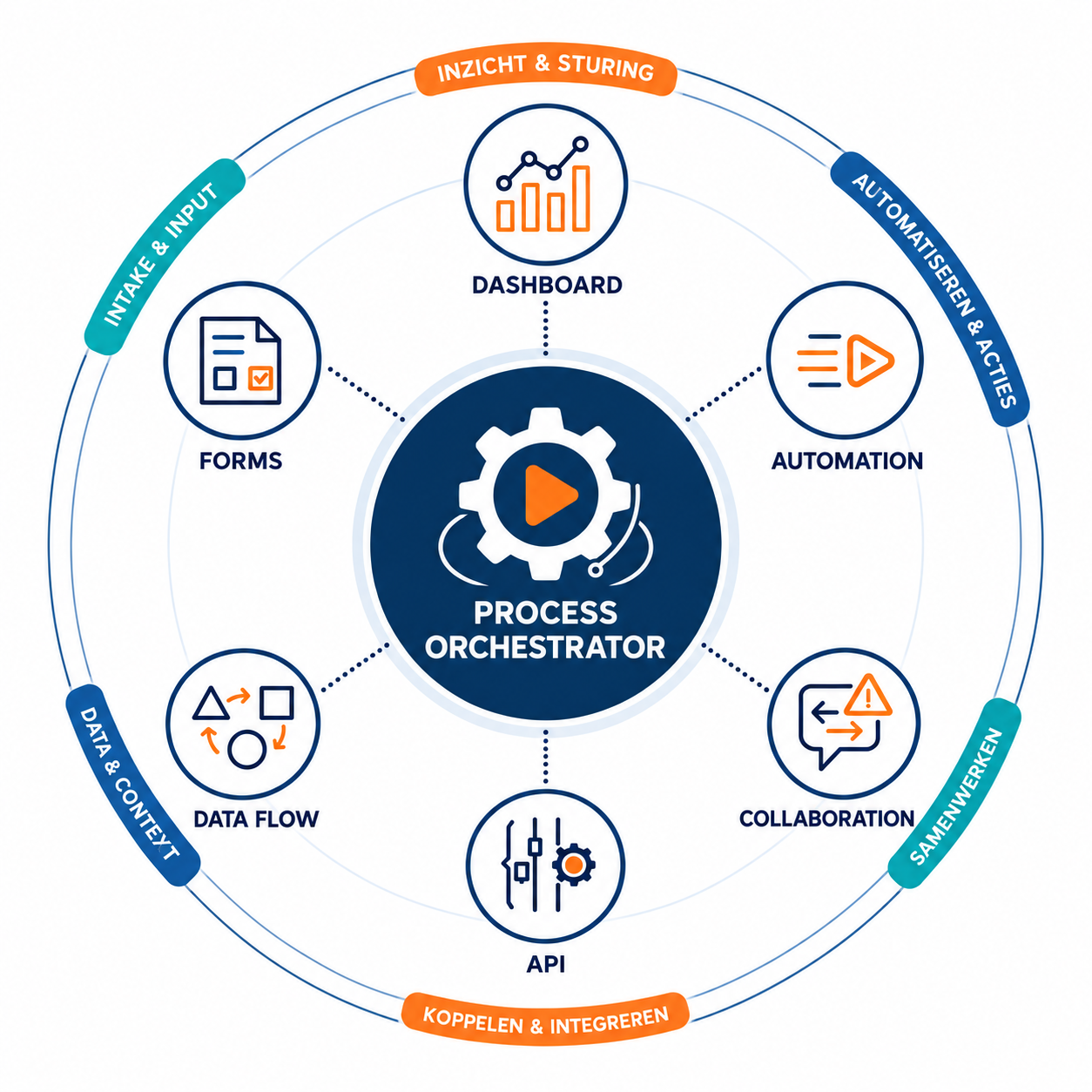
The connected platform
Connect data, people and actions.
API, Data Flow and Forms bring data and input together. Automation and Collaboration connect actions and collaboration. Start with one use case and build on the same connections and agreements.
The diagram shows the connected model. The general-purpose Process Orchestrator and Dashboard Composer are being developed. Explore development.
Explore all componentsMeet us · share ideas · get inspired
Meet each other. Share knowledge.
New opportunities to share knowledge and practical experience are coming. Keep an eye on the agenda.

Where would you like to start?
Tell us what falls between your systems. Together we can identify the right first step.
Keep exploring
What would you like to connect next?


Pull up a chair. Or join us online.
Over coffee, tea or online: tell us what you are working on.
We can help with the integrations, automation and coordination your process needs, even if your application is not listed yet.
