
One workflow for HR changes and self service
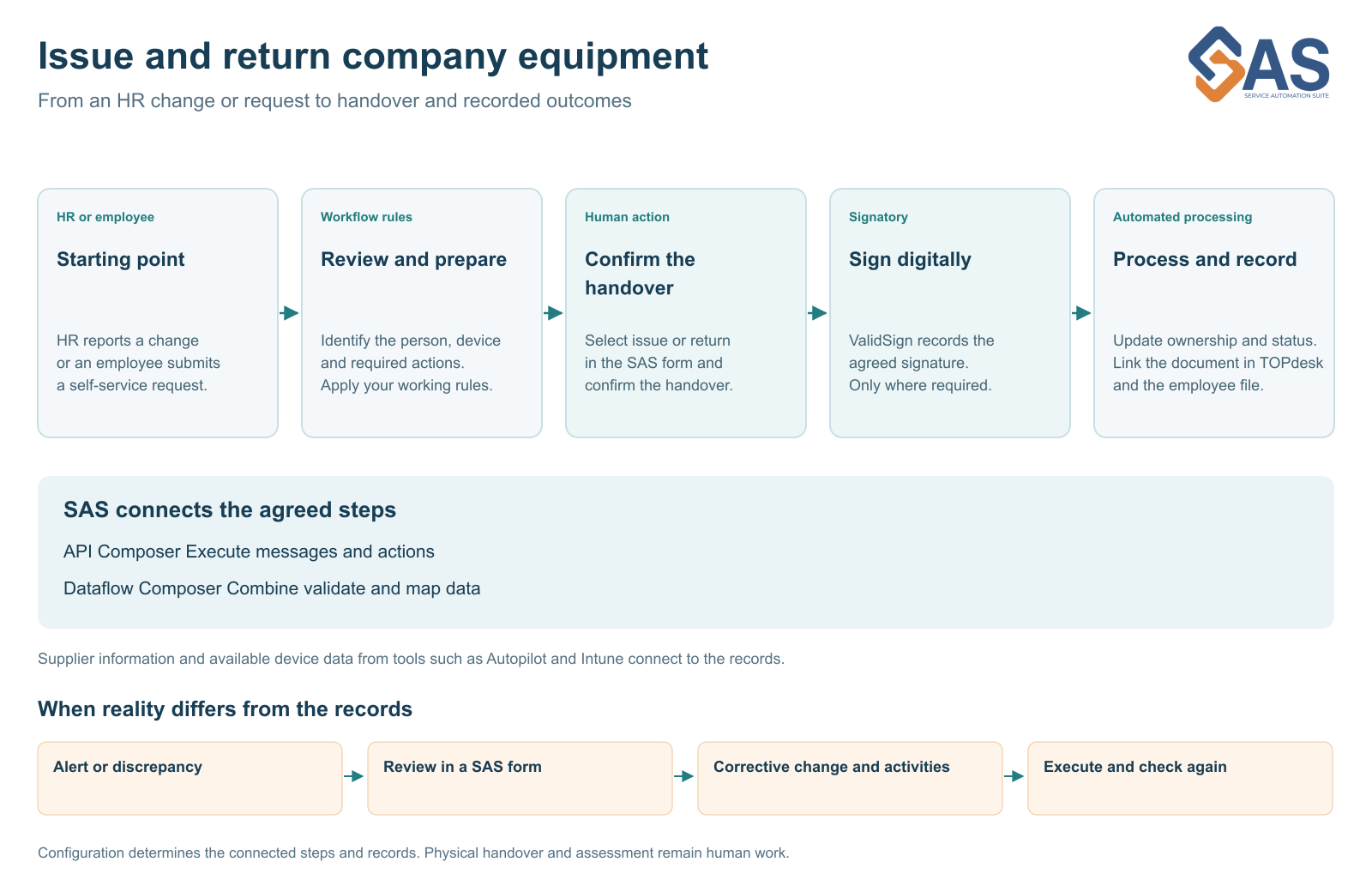
A new employee, role change or TOPdesk self-service request can trigger the same workflow. Connect HR, IT and facilities to issue, return and signing.


A new employee receives a laptop because HR reports their start date. An existing employee requests a replacement through the Self Service Portal. These are different entry points for the service desk, but many of the next steps are the same. They are nevertheless often configured and maintained separately.
Different triggers with a shared workflow
With Service Automation Suite, an HR change and a TOPdesk self-service request can join the same agreed workflow. The trigger may differ, but employee matching, equipment selection, confirmation and administrative processing need not be redesigned each time. The person performing the handover confirms issue or return in the Service Automation Suite form. In the configured standard workflow, the agreed asset and document data are then processed without repeating the same action separately in TOPdesk and the HR file.
The HR source may be AFAS or Visma Youforce, for example. We connect available information to the relevant records and activities. Configuration determines which event starts the workflow and when review is required.
Connect joining changing roles and leaving
On joining, equipment needs to be ready on time. A role change may alter what someone needs. On leaving, issued equipment must be returned and outstanding activities handled. Consider the complete lifecycle, even when starting with one step.
Physical equipment and digital access can meet in the same employee workflow. Taking back a laptop, requesting a pass and changing accounts are different actions with their own owners and confirmations. Service Automation Suite connects those actions to the information and rules they need.
Teams keep their own workplace
HR remains responsible for employee information. IT and facilities handle their work. TOPdesk can record assets, changes and activities; ValidSign supports a receipt or declaration where required. The document can then also reach the connected employee file.
Employees do not need to know which team maintains each record. Their chosen entry point carries the required information to the appropriate next action.
Make team handovers explicit
Agree which source is authoritative, who reviews a change and what counts as completed. An HR departure date may have passed while a phone remains unreturned. Keep these differences visible and assign responsibility for follow-up.
Start with one recognisable workflow and the people who perform it daily. Test outcomes and exceptions with them. Then build further using the same data and rules rather than creating a separate solution for every entry point.
Explore examples for AFAS, Youforce and TOPdesk.
From separate handovers to control
The municipality of Zoetermeer brought separate scripts, emails and individual knowledge together in a manageable employee lifecycle workflow with TOPdesk as a central coordination point. This is a familiar starting point when HR, IT and facilities handle the same changes separately. Explore Zoetermeer’s approach.
See this workflow in a demo
We can demonstrate this approach. Show us where your team retypes information or chases outstanding actions. Together, we can choose a first step that fits your environment.
More about this workflow
Explore the next part of the workflow · Read another perspective
Solutions, scenarios and technology.
Continue directly from the context of this story.

More from the same context.
Less administration and more control of equipment
Build time savings, ownership and evidence into your equipment workflow. Start with one measurable step and build further together.
From a discrepancy to a completed correction
A laptop passed on or a signature missing? Connect insight to review, a TOPdesk change and verification of the completed correction.
Asset records need to match reality
Supplier data, Intune and TOPdesk each tell part of the story. Service Automation Suite connects that information to ownership, issue and return using clear source rules.
A signature that moves the workflow forward
Connect ValidSign digital signing to equipment handover, return and filing in TOPdesk and HR, so a signed document does not remain a disconnected attachment.
Recognize this in your organization?
Discuss your process, scenario or control chain with us. You do not need to know the answer yet.