
Issue company equipment without duplicate work
Connect equipment issue and return to TOPdesk, ValidSign and HR. People handle the handover; Service Automation Suite automates the agreed records and document processing.


A laptop is ready for a new colleague. The physical handover takes little time. Afterwards, someone must link the employee and device, update the asset status and file the receipt. That follow-up often creates retyping, separate lists and corrective work.
Let the handover start the processing
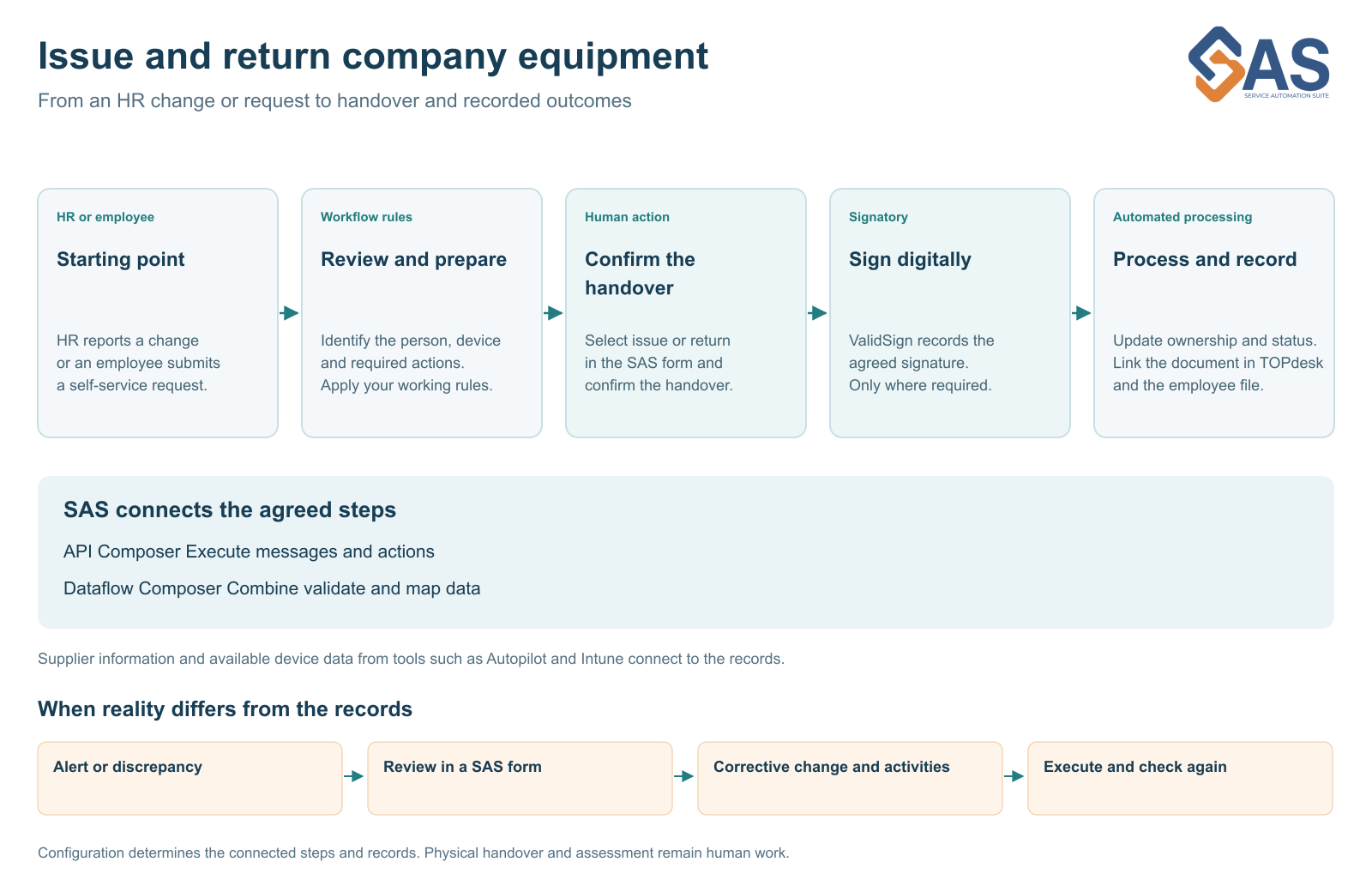
With Service Automation Suite, we connect equipment issue or return to the agreed next steps. In the Service Automation Suite form, select issue or return and identify the equipment and employee. Confirm the actual handover. Service Automation Suite uses that selection to update connected records and process the required documents.
The workflow can start with an HR change or a request in the TOPdesk Self Service Portal. Both triggers follow the same configured approach. Your working agreements determine which approval, confirmation or signature is required.
TOPdesk and ValidSign play their part
In TOPdesk, we record the employee–asset relationship and agreed status. When a receipt or loan agreement needs a signature, ValidSign becomes part of the workflow. The signed document can then be linked to the TOPdesk record and, where connected, forwarded to the employee’s HR file.
The physical handover and signing remain human actions. The benefit is the follow-up that people no longer have to record repeatedly. A standard handover need not require entering the same information separately in several administration environments.
The workflow continues on return
Replacement, a role change or departure also requires knowing what was actually returned. A confirmed return can update asset status and the employee relationship. Missing equipment remains visible as work someone must handle.
This ties the record to a confirmed action. An employee leaving in HR is not, by itself, evidence that a laptop or access pass has physically been returned.
Start with one equipment type
You do not need one large project covering every asset and department. Start with laptops, for example. Agree who issues them, who confirms the handover, what needs signing and where the document belongs. Then extend the approach to phones, accessories, passes or other equipment.
API Composer connects messages and actions. Dataflow Composer combines and maps the required information. We build on your existing applications, with clear agreements for maintenance and follow-up.
Explore the integration examples for TOPdesk and ValidSign.
A familiar challenge in practice
NVM brought HR and IT together in a standardised employee workflow covering permissions, equipment and access. Its story illustrates why coordination across teams matters beyond individual data transfers. Read the NVM customer story.
See this workflow in a demo
We can demonstrate this approach. Show us where your team retypes information or chases outstanding actions. Together, we can choose a first step that fits your environment.
More about this workflow
Explore the next part of the workflow · Read another perspective
Solutions, scenarios and technology.
Continue directly from the context of this story.



More from the same context.
Less administration and more control of equipment
Build time savings, ownership and evidence into your equipment workflow. Start with one measurable step and build further together.
From a discrepancy to a completed correction
A laptop passed on or a signature missing? Connect insight to review, a TOPdesk change and verification of the completed correction.
Asset records need to match reality
Supplier data, Intune and TOPdesk each tell part of the story. Service Automation Suite connects that information to ownership, issue and return using clear source rules.
One workflow for HR changes and self service
A new employee, role change or TOPdesk self-service request can trigger the same workflow. Connect HR, IT and facilities to issue, return and signing.
Recognize this in your organization?
Discuss your process, scenario or control chain with us. You do not need to know the answer yet.