


Employees & access
Account, laptop and access ready on time.
A new colleague needs more than an account. Assets, service activities and HR administration must align across onboarding, role changes and offboarding.
What Service Automation Suite coordinates centrally
Maintain your data in your own applications.
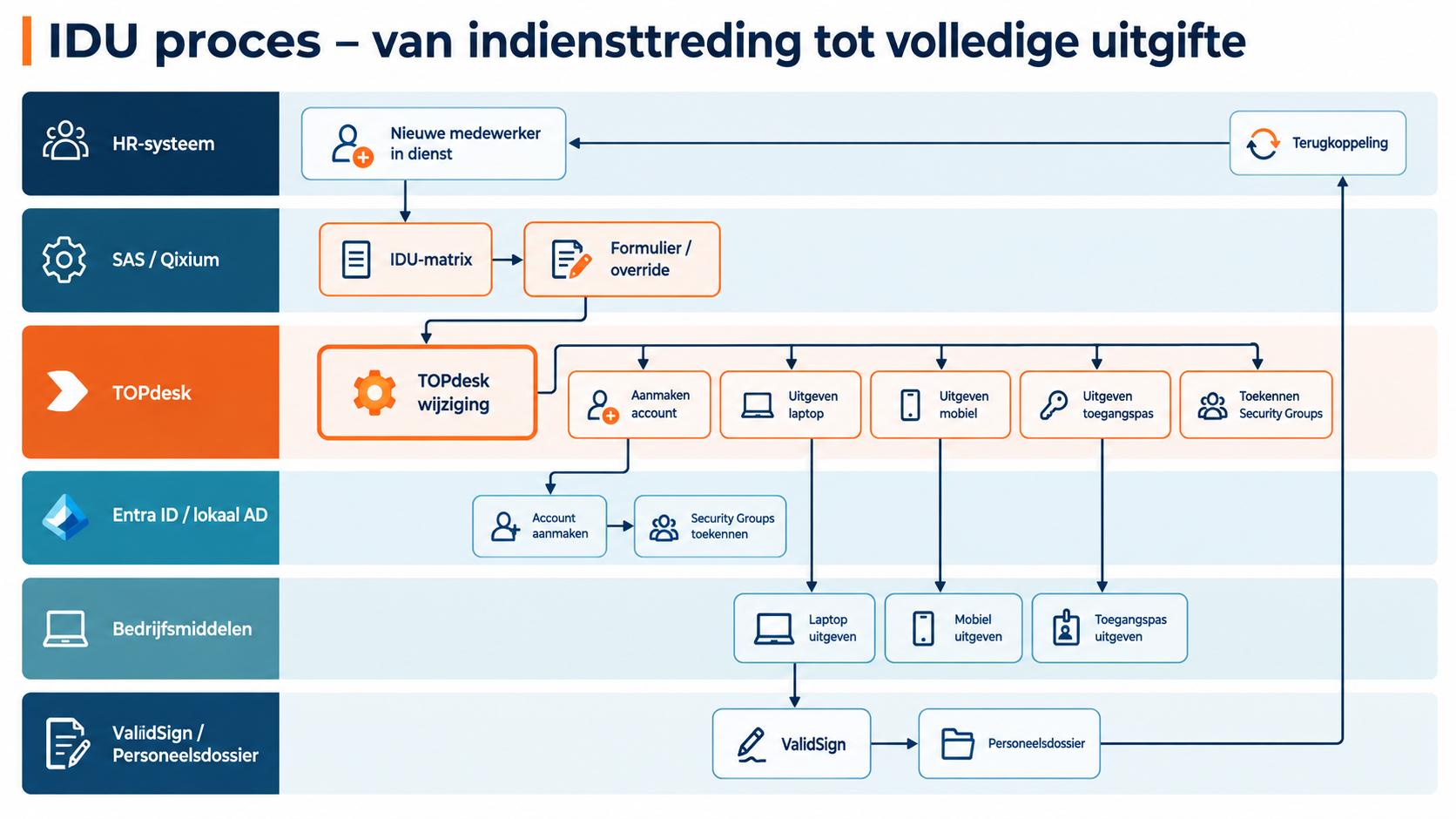
Service Automation Suite combines that source data with your role and access matrix and orchestrates the whole workflow: accounts and groups in Entra ID or local AD, asset handover and return tasks, signing through ValidSign and recording the outcome in TOPdesk and the personnel file.
What your team gains
A complete start for a new colleague: account, access, equipment and a signed receipt coordinated together. HR, IT and facilities spend less time re-entering data and chasing separate tasks. The same workflow coordinates changes and returns when someone changes roles or leaves.
See what is complete and what still needs attention.
For example, in your setup
Onboarding with a matrix and forms
The right questions and activities for this employee.
Use role, department, location and start date to determine the workflow. Reuse what is already known and ask specifically for what is missing.
Combine and determine
Combine HR and TOPdesk data with your matrix for access, assets and work. Determine the questions and activities relevant to this situation.
Add what is needed automatically
Offer additional questions through a form. Let new information add or update the required activities instead of manually rebuilding the entire onboarding workflow.
Execute and report back
Execute account, asset and service tasks through the configured workflow. Record status and results in TOPdesk and agreed HR records; exceptions remain part of the same process.
Onboarding
From employee change to a complete start.
Service Automation Suite connects IAM to the wider employee workflow. Use a matrix in Service Automation Suite to relate roles to access, assets and tasks, for example. Combine those rules with current HR and TOPdesk data and agree who maintains the matrix. This determines the changes and actions needed.
Combine available information
Use the HR change and current person, access and asset data. Forms or reviews supply missing information and exceptions.
Let the matrix define the route
Service Automation Suite applies role profiles, conditions and effective dates. Start or update the TOPdesk change with appropriate activities for HR, IT and facilities.
Execute, confirm and update
Connect account and group actions to asset handover and confirmation. Include ValidSign signing and file storage where needed. Return outcomes to the activities.
Complete the loop with HR
Once the account is created, write agreed account data or status back to AFAS or the chosen HR source. The TOPdesk activity receives the same outcome. HR and IT no longer need to copy or chase confirmation separately.
Role change
A different role. An appropriate new setup.
Service Automation Suite connects IAM to the wider employee workflow. Use a matrix in Service Automation Suite to relate roles to access, assets and tasks, for example. Combine those rules with current HR and TOPdesk data and agree who maintains the matrix. This determines the changes and actions needed.
Combine available information
Use the HR change and current person, access and asset data. Forms or reviews supply missing information and exceptions.
Let the matrix define the route
Service Automation Suite applies role profiles, conditions and effective dates. Start or update the TOPdesk change with appropriate activities for HR, IT and facilities.
Execute, confirm and update
Connect account and group actions to asset handover and confirmation. Include ValidSign signing and file storage where needed. Return outcomes to the activities.
Complete the loop with HR
Return confirmed changes or revocations to TOPdesk activities and, where agreed, the HR source. Employee records, execution and follow-up stay aligned.
Offboarding
Departure known. Access and assets follow through.
Service Automation Suite connects IAM to the wider employee workflow. Use a matrix in Service Automation Suite to relate roles to access, assets and tasks, for example. Combine those rules with current HR and TOPdesk data and agree who maintains the matrix. This determines the changes and actions needed.
Combine available information
Use the HR change and current person, access and asset data. Forms or reviews supply missing information and exceptions.
Let the matrix define the route
Service Automation Suite applies role profiles, conditions and effective dates. Start or update the TOPdesk change with appropriate activities for HR, IT and facilities.
Revoke, recover and complete
Connect revocation of access and groups to asset returns. Update relationships and records, keeping open activities visible until their outcome is known.
Complete the loop with HR
Return confirmed changes or revocations to TOPdesk activities and, where agreed, the HR source. Employee records, execution and follow-up stay aligned.
Back to AFAS
Return the outcome to AFAS too.
AFAS can supply data and receive outcomes. Have a completed workflow step update agreed data in AFAS. This is a separate route, not an automatic reversal of every sync.
Identify confirmed execution
Use the confirmed completion of an activity, such as account creation. The outcome, not merely the command, triggers feedback.
Define what AFAS should receive
Service Automation Suite applies matching, mapping and processing rules. Only selected data is written back.
Update and record the outcome
Process through the available AFAS interface and link success or failure to the original workflow.
Manage access
Approved. Executed under control.
Connect an approved request to account or access actions. Policy and authorisation remain authoritative.
Record the decision
Check the approved person, access and duration. An unapproved request does not authorise execution.
Choose the executor
Execute the available account or group action through the configured connection. If HelloID manages the lifecycle, Service Automation Suite connects to it without duplicating its rules.
Report the result
Record whether the action succeeded. Route errors or exceptions to the authorised operator; sending a command is not proof of successful execution.