Read agreed person data and valid employment. Use a supported webhook or a controlled retrieval schedule.
Prepare access and equipment
Match the employee to the right account and service records. Review uncertain matches and required approvals.
Confirm completion
Record what each task completed and who handles exceptions. Keep HR data distinct from confirmed execution.
Sign for equipment
Equipment handed over. Receipt confirmed.
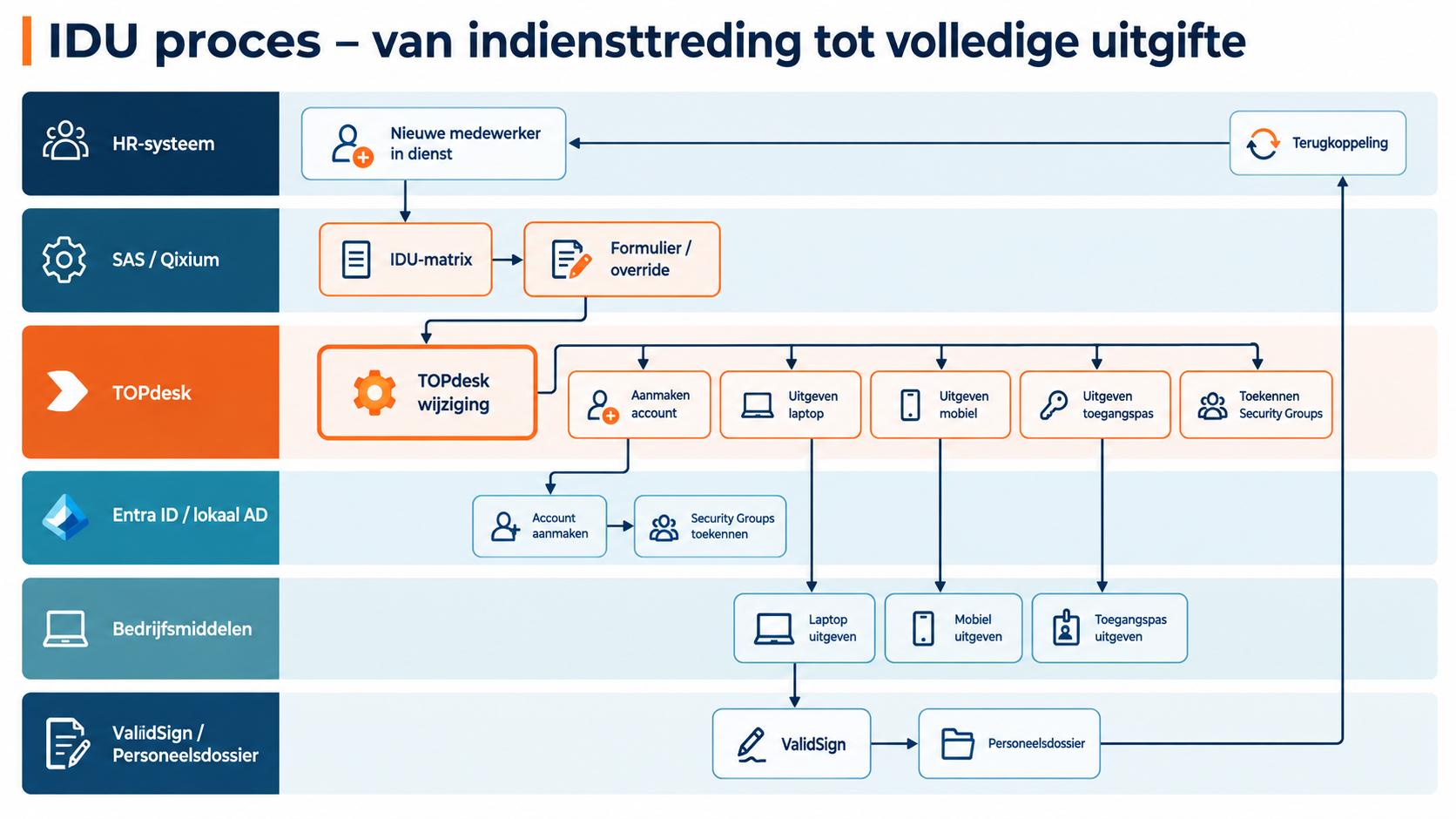
An employee joins or changes roles. Connect the HR change to a laptop or phone handover and request digital confirmation of receipt, for example through ValidSign. Service Automation Suite brings the employee, asset, document and follow-up together. Configuration follows your rules and the available interfaces.
Service Automation Suite · Central coordination
Connect assignment, handover and signing
Combine the data with your policy, risk assessments and checks. Request information or a decision where needed, track actions and record the outcome.
Start with the employee
Onboarding or role change and agreed equipment
Confirmation & records
For example, digital signing and evidence linked to the asset
Define the equipment handover
Use employee and role data from the chosen HR source. Check the assigned equipment, required approval and handover owner. Link employee and asset to the same request or activity.
Request confirmation of receipt
Prepare a receipt or equipment loan declaration with the correct employee and asset data according to your rules. Start a signing request in ValidSign, for example, and track the available signing status. Sending a request does not mean receipt has been confirmed.
Store evidence and follow up exceptions
After confirmed signing, store the document or its reference with the correct asset and record, for example in TOPdesk. Assign an owner to declined or expired requests and missing data. Configure feedback to HR only where available and agreed.
How Service Automation Suite connects data and execution
The work between your applications
Work from Personio. Connect the next step.
Connect Personio person and employment data to access, equipment and service tasks. Service Automation Suite translates agreed changes into work for IT and support teams, with confirmation and follow-up. We validate API capabilities, readable attributes and permissions for your environment.
A change, request or alert
Service Automation Suite
Data, people, assets and relationships on one foundation.
Compare
What exists? What should exist?
Determine what is needed
Matrix · policy · legal requirements
Coordinate the next steps
Checks · tasks · approvals · actions
Execution ↔ feedback
Your people and tools
Microsoft Entra ID
For example. Also with other teams, suppliers and applications.
Verify. Inform. Report.
What is complete? Who needs to act? Which exception needs attention?
Start with one integration, register or check. Build on the same data and rules.
Combine into one controlled process
Data → rules → execution
Combine
HR + role + start date
Determine & check
Determine profile, check and approve
Execute & report back
Entra: account and groups · TOPdesk: laptop handover · Welcome task: arrange flowers
View the complete onboarding example
Check sources and rules, test changes and track the outcome. Manual tasks get an owner and confirmation.
Build visually. Manage easily.
Reuse building blocks, adapt your process and test the change. Manage it yourself, together with us or let Scope4mation take care of it.
Connect work across your applications
What would you like to connect Personio with?
Choose the role in your workflow. Explore applications from the scenarios and further directions to discuss together. We define the data, actions and available interface for each combination.
Start with one use case. Connect customer, employee and asset data, for example, and agree which source is authoritative. Reuse those relationships, a matrix where needed and configured actions in the next workflow. Agree who maintains the data and rules. Expand without repeatedly connecting and maintaining the same information.
Signature declined. Keep the process moving.
A request awaits a ValidSign signature. Declining, expiry and technical failure each need different handling.
Combine
Link the request, signing request and document. Read the available status and apply agreed conditions to determine the next action.
The outcome determines what follows
Signed: process the document and confirm the activity. Declined: route the reason to the owner. Temporary technical failure: retry only under the configured error rule.
The benefit
Appropriate follow-up for each outcome without counting a sent signing request as completed work.
Temporary access, with the end handled too.
Additional access is approved for a limited period. A checkbox alone does not preserve why, for whom and until when.
Combine
Connect identity, approval, expiry date and the available access action. Reuse the same data for a scheduled follow-up check.
The outcome determines what follows
Revocation confirmed: record the result. Extension requested: ask for a new decision. Not revoked: raise the exception with the authorised group rather than silently completing it.
The benefit
Fewer forgotten exceptions and a traceable relationship between approval and actual access.
A different name does not mean a new record.
A person or organisation has a different name in the source than at a customer or supplier. Matching text again can create incorrect or duplicate relationships.
Combine
Retain verified identifiers and source rules in a shared table. Reuse the relationship for requests, tickets and other integrations.
The outcome determines what follows
Known key: use the relationship. Multiple candidates or a missing identifier: request review. Once confirmed, reuse the established relationship.
The benefit
A consistent data foundation managed by your team instead of investigated again for every connection.
Your process needs more than a standard action?
Configure the missing API request, input and output in API Composer. Use its response in the next step and combine it with data tables, forms and automations. Extend the same product and reuse the configured building blocks.
Use Service Automation Suite to update a ticket in TOPdesk, for example, with fields available through its API, such as category, priority, status and support group. For another application, configure its request and field mapping. The outcome determines the next action: confirm, add information or request review, not merely check whether the request arrived.
Need to publish data or let others submit it? Endpoint Composer exposes a configured Service Automation Suite data object with selected methods and security profiles. Other building blocks handle subsequent processing.
Pull up a chair. Or join us online.
Over coffee, tea or online: tell us what you are working on.
We can help with the integrations, automation and coordination your process needs, even if your application is not listed yet.