

 Microsoft Intune
 Freshworks
A Freshservice ticket. Who keeps other systems up to date?
Integration · automation · orchestration
Connect your applications. Take care of the work between them. We combine data, actions and process agreements. Start with one bottleneck and build further together using reusable components.
Explore the possibilitiesThen explore which data, actions and processes logically connect.
By date added. Integrations without a known date appear last.
Popular on our website · past 30 days
No matching integration. Try another search or discuss your application with us.
Freshworks
A Freshservice ticket. Who keeps other systems up to date?
 TOPdesk
Current data, tasks and feedback across departments.
 Canon
Ticket with Canon. Keep progress at your service desk.
 N-central
Connect N-able N-central to your service workflow
 GIPOD
From a relevant ticket to current information in GIPOD.
 AFAS
An HR change. Access, assets and service move with it.
 HelloID
IAM is ready. Are assets and service tasks ready too?
 ValidSign
Signed, but the file is still empty?
 Docusign
From signing to a complete work record.
 TrustBound GRC
From control definition to traceable execution.
 Jamf Pro
Apple management connected to assets and employees.

 Microsoft Defender
A security alert. With the right follow-up.
Microsoft
An employee has left. Is access still active?
 Nedap Ons
Connect employees and teams to your organisation.
 Pax8
Cloud subscriptions connected to the organisation using them.
 TimeTell
Time recorded. Connected to your administration.
 Matrix42
Service work in Matrix42, connected to your other teams.
 PowerShell
Your administrative script. Part of the whole workflow.
 Microsoft Intune
From device data to process follow-up.
 Youforce
No disconnected handover from HR to IT.
 Teamleader One
Quotation or invoice ready. What happens next?
 Corsa
Documents and follow-up in the same case file.
 SmartDocuments
From approved data to a document and follow-up.
 NEDAP
From an AFAS change to the right physical access.
 HR2day
 updated. Are the next steps keeping up?
 PRTG
From a PRTG alert to action in TOPdesk.
 HaloITSM
The service continues. The information does not.
 LogicMonitor
An alert is not yet an actioned incident.
 Salesforce
Deal won. Handover missed.
Microsoft Sentinel
A security incident. Follow-up connected too.
 Lansweeper
Found on the network, missing from your records.
 Ultimo
Maintenance complete. Is the asset record still accurate?
 Tanium
Assets to your CMDB. Alerts to your service desk.
 Exact Online
Work done. Still retyping invoice data?
 Teamleader Orbit
From customer and project to delivery and accounting.
 Microsoft Dynamics 365
Customers, sales and administration. Connected to the next steps.
 Bechtle
IT procurement arranged. Internal follow-up too?
 ALSO
From distributor order to receipt and handover.
 Dustin
From hardware supplier to one connected process.
 NIPV
Fire service clothing for safety regions. Keep issue and return organised.
 Snow License Manager
Software in use. Does the licence still fit?
 Rx.Mission
A permitting case with controlled follow-up.
 Centric Zaakgericht Werken
Connect case information without re-entering it.
 Moneybird
Invoice paid. Who takes the next step?
 Nmbrs
Employee data updated, access still waiting.
 TimeEdit
A timetable change that reaches service too.
 OSIRIS
Student information without disconnected handovers.
 EduViewz
From education data to focused follow-up.
 Educator
A change in the SIS, with follow-up in step.
 Progress
Connect student and education processes with service.
 Loket
A role change should not get stuck in an inbox.
 Simplicate
Project started. Who handles the handover?
 Workday
A change in Workday. What happens next?
 Microsoft Entra ID
A TOPdesk request. Access follows under control.
Active Directory
Local access is part of the employee lifecycle too.
Microsoft Azure
Cloud resources grow. Do your records keep up?
Microsoft SCCM
Devices change. Your assets should follow.
Microsoft SQL Server
Local data. Still part of the same process.
 ServiceNow
Two service desks, duplicate work.
 Servicely
One ticket, several teams and systems.
 Jira
A service ticket disappears into development.
 Autotask
The supplier knows. Your team does not.
 Zendesk
The customer has to explain everything again.
 HubSpot
Sales and service see different customer data.
 Google Workspace
A new colleague, scattered account lists.
 Slack
The right update, in the wrong channel.
 Aha!
Connect AFAS customer data to context in Aha!.
 GitHub
An issue is resolved, without an update to support.
 AWS EC2
Cloud grows faster than your records.
 SDB HR
Employees and employment records in the right place.
 Ysis
Connect departments and locations across care applications.
 Luscii
Connect home measurements to the right care information.
 Zenya
Connect quality data to operational work.
 SDB Planning
Align planning and hours with HR.
 Open Zaak
Exchange case data while retaining relationships.
 Open Formulieren
From form submission to the correct record.
 Decos JOIN
Connect cases and documents to other records.
 PDOK / BAG
Enrich address data with stable BAG references.
 ChipSoft Zorgplatform
Connect authorised healthcare data selectively.
 ORTEC Workforce
Connect rosters and worked hours to administration.
 Visma.net Financials
Transfer relations and financial data consistently.
 Twinfield
From customer or project data to the correct accounts.
 PostgreSQL
Load database data into applications with control.
 MySQL
Connect database data with surrounding operations.
 Oracle Database
Make existing Oracle data usable across systems.
 Elasticsearch
Make data from multiple sources searchable.
Microsoft Dataverse
Connect business app tables with other sources.
 Mollie
Connect payment status to invoice or customer records.
 DocuWare
Documents and metadata alongside the correct record.
 Planon
Connect buildings, rooms and assets to service records.
 Zabbix
Relate monitoring data to your CMDB and service team.
 Proxmox VE
Make virtual infrastructure visible in asset records.
 Nextcloud
Connect files with the correct record.
 Ingram Micro
From supplier delivery to verified TOPdesk records.
 TD SYNNEX
Procurement data matters when the follow-up is correct.
 Hudu
Operational documentation aligned with actual records.
 Xurrent
Work from Xurrent. Connect the complete workflow.
 Jira Service Management
Service requests in Jira Service Management. Connected follow-up.
 SAP SuccessFactors
An employee change in SuccessFactors. Connected next steps.
 Microsoft SharePoint
SharePoint documents and lists, connected to your workflow.
 Zoho Desk
Customer questions in Zoho Desk, with connected follow-up.
 CSV-bestanden
A local export. A connected workflow.
 SAS Agent
Include your local environment.
Reusable components, configured around your agreements. We agree together how management and maintenance are organised.
This directory shows applications and possible use cases. For each combination, we assess available interfaces, existing components and your environment. You know what can be reused and what still needs configuring together.
Build visually. Connect smartly.
Retrieve data, combine what you need and follow up with the right action. API Composer and Data Flow Composer work together in one platform. Build step by step, with our help to get started.
From fictitious HR data to a person in TOPdesk: select, link the department and prepare the data for use.
Read employee data from the HR system through an API.
Select fields and combine HR data with departments from TOPdesk.
Map fields and prepare the values TOPdesk expects.
Use the result to create a person in TOPdesk and review the response.
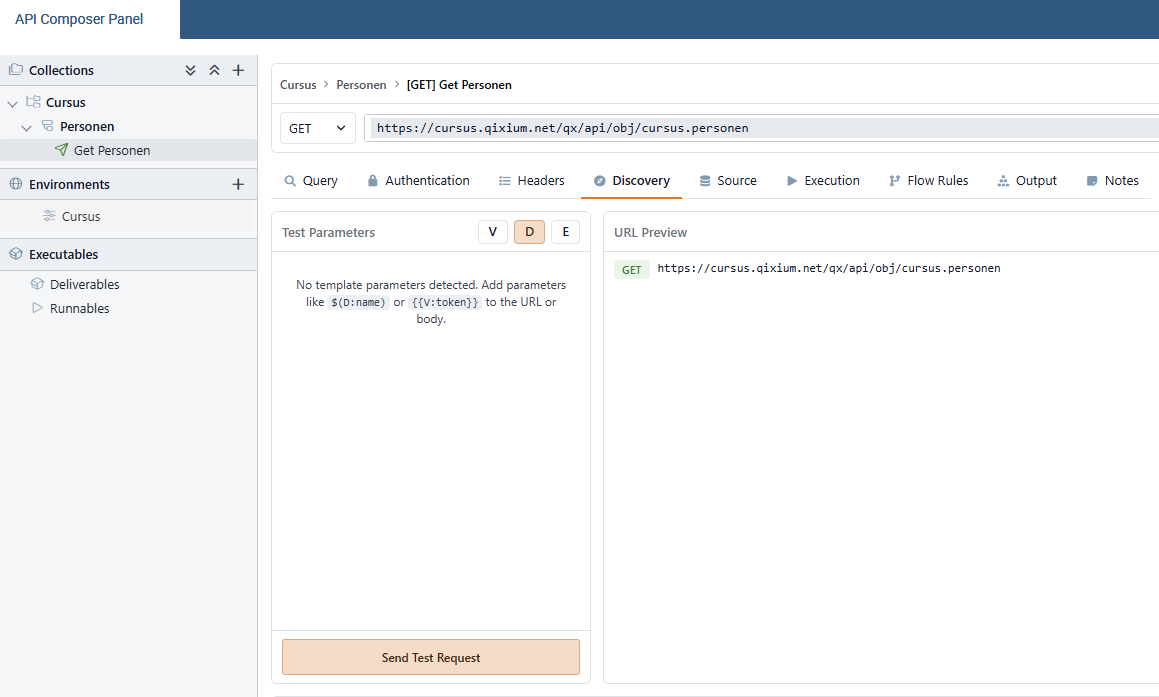
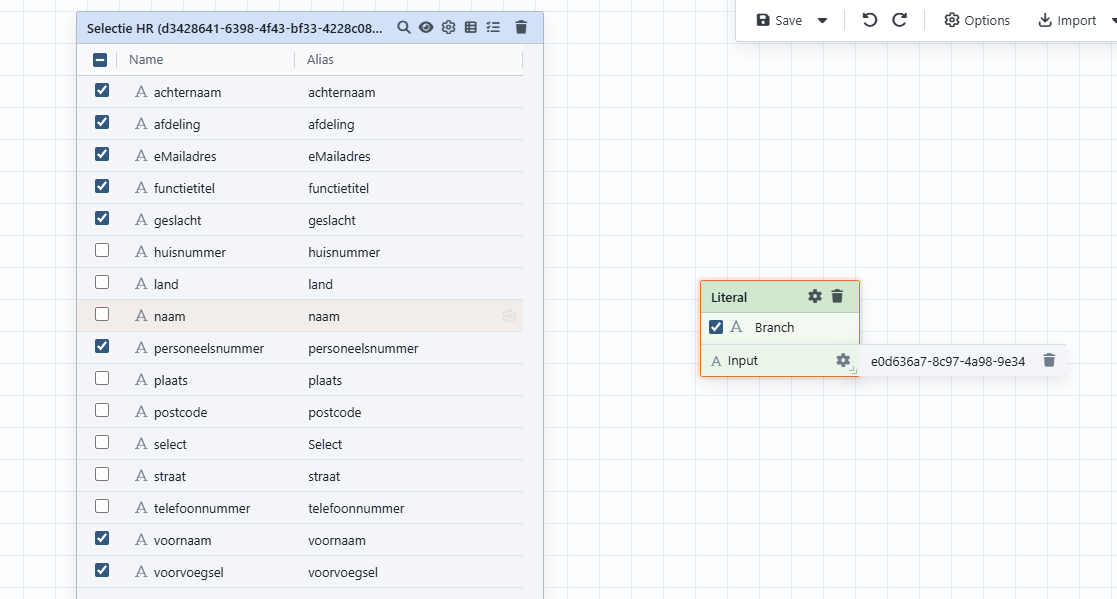
Actual product screens from our course, using fictitious training data. Click to enlarge. Configuration and available APIs determine what your integration can do.
Use existing components as a foundation for your next integration.
A consistent way to retrieve, process and execute, with guidance from Scope4mation.
Give components and steps clear names so a colleague can follow the structure and take over.
Adapt your integration, test the result and keep building. Let your process grow with your needs.
Start with one use case. Connect customer, employee and asset data, for example, and agree which source is authoritative. Reuse those relationships, a matrix where needed and configured actions in the next workflow. Agree who maintains the data and rules. Expand without repeatedly connecting and maintaining the same information.
A supplier closes its ticket while internal verification or user confirmation is still missing.
A request awaits a ValidSign signature. Declining, expiry and technical failure each need different handling.
Procurement, a supplier and technical inventory each hold part of the picture. A delivered asset is not automatically assigned to its correct owner.
Configure the missing API request, input and output in API Composer. Use its response in the next step and combine it with data tables, forms and automations. Extend the same product and reuse the configured building blocks.
Use Service Automation Suite to update a ticket in TOPdesk, for example, with fields available through its API, such as category, priority, status and support group. For another application, configure its request and field mapping. The outcome determines the next action: confirm, add information or request review, not merely check whether the request arrived.
Build it yourself: explore the technical approachNeed to publish data or let others submit it? Endpoint Composer exposes a configured Service Automation Suite data object with selected methods and security profiles. Other building blocks handle subsequent processing.
Which handover is costing your team time? Together, we choose one practical first step using the systems you already have.
