
Across teams and systems
Connect HR, IT, facilities, finance and suppliers through shared data and rules. Your process shapes the setup.
Integration · Service Automation Suite

Connect TOPdesk to HR, identity, monitoring and suppliers. Coordinate tickets, equipment and employee workflows with controlled execution.
Continuity, experience & maintenance
TOPdesk’s own integration capabilities can be a good fit. Service Automation Suite and Scope4mation help configure the complete workflow and keep it running, with agreed execution, checks and maintenance.
Connect HR, IT, facilities, finance and suppliers through shared data and rules. Your process shapes the setup.
Define who acts, which approval is needed and when a step is complete. Keep exceptions and feedback with the same process.
Use our integration and process experience. We configure the workflow for your applications, available APIs, modules and permissions.
APIs, permissions and processes change. Agree who tests changes, resolves failures and verifies operation.
Document source rules, configuration and operations so a colleague can take over and continuity does not depend on one builder.
An included connector does not make configuration, testing, operations and handover free. With a self-built solution you organise these yourself; with us you agree the support required.
Document hosting, processing, support access and involved suppliers. Explicitly assess processing or access outside the EU. The country of establishment alone does not tell the whole story.
Agree ownership, documentation, export and handover. Service Automation Suite adds a central configuration, so define our role and maintenance responsibilities clearly too.
More from your existing applications.
TOPdesk as the central place for your service delivery. Service Automation Suite automatically keeps people, assets and relationships up to date and connects your other applications to the work in TOPdesk. Less retyping, comparing and chasing. More from the tools you already have.
It does not stop at one import or integration. Start small, but connect the pieces properly: shared data, rules and checks that your next process can build on.
Record decisions, tasks and confirmed results against the right TOPdesk record. Make the configured process traceable, including for audits. See what is complete and which exception still needs action.


TOPdesk request + HR + equipment
Profiles, rules and approval determine the route
Entra account action · Equipment handover · Signing · Report back to the request
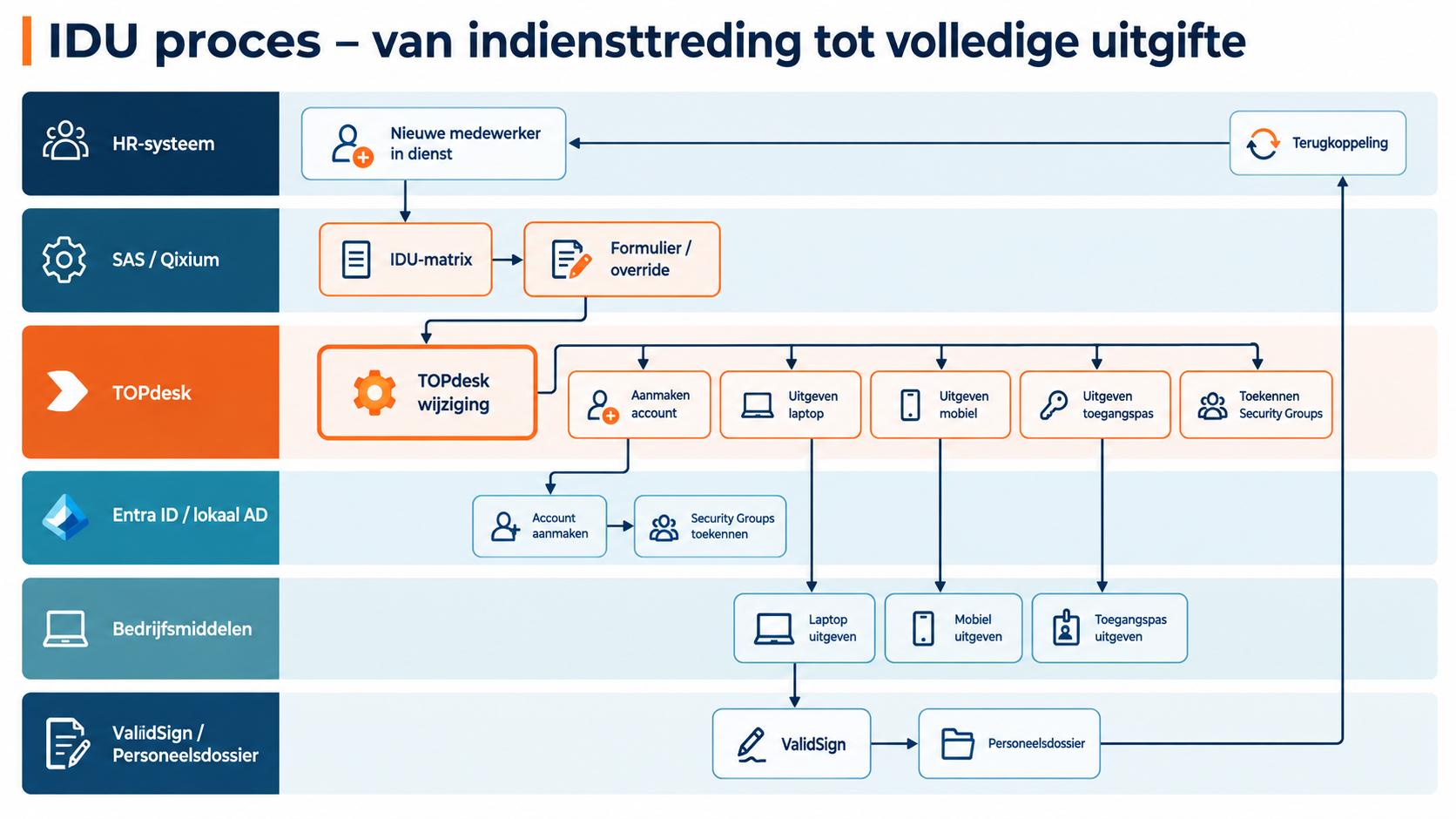
Check sources and rules, test changes and track the outcome. Manual tasks get an owner and confirmation.
Reuse building blocks, adapt your process and test the change. Manage it yourself, together with us or let Scope4mation take care of it.
People & organisations
A change in HR or business administration should carry through to the people and organisations your service team works with. Without retyping or maintaining separate spreadsheets.
Service Automation Suite recognises relationships across systems, combines data with a central register and applies agreed source rules. Incomplete or conflicting data calls for review, not blind overwriting.
Your team works with current people and company records. The same context can be reused for requests, changes and employee processes.
Use AFAS as the source for people, branches or companies in TOPdesk. Service Automation Suite matches relationships and updates agreed fields, giving tickets and requests the right context.
Read relevant people and organisation data from AFAS. Use agreed identifiers to match the same relationships.
Create missing records and update changed fields and relationships. Data managed elsewhere stays with its authoritative source.
Use current person and organisation data in service requests, changes and employee lifecycle workflows. Data sync is the foundation; workflow execution is the next step.
Use Youforce as the source for people, branches or companies in TOPdesk. Service Automation Suite matches relationships and updates agreed fields, giving tickets and requests the right context.
Read relevant people and organisation data from Youforce. Use agreed identifiers to match the same relationships.
Create missing records and update changed fields and relationships. Data managed elsewhere stays with its authoritative source.
Use current person and organisation data in service requests, changes and employee lifecycle workflows. Data sync is the foundation; workflow execution is the next step.
Assets & ownership
A technical inventory tells you what a management tool sees. Asset management also needs to know what was ordered, delivered, assigned or returned.
Service Automation Suite combines supplier and asset registers with observations from management tools. You define the authoritative source for each field. Differences receive an owner and a follow-up action.
Records you can build on for handover, returns, replacement and actual-use checks. A device that disappears from inventory has not necessarily been returned.
Connect inventory from Microsoft Intune to TOPdesk Asset Management. Service Automation Suite matches devices and relationships, maps attributes and keeps agreed records current.
Use available device attributes and the agreed scope. Define the authoritative source for each field.
Avoid duplicate assets, update changed fields and connect the right people to their assets.
Connect missing data, a changed owner or an employee departure to tasks, changes or asset returns.
Connect inventory from Microsoft SCCM to TOPdesk Asset Management. Service Automation Suite matches devices and relationships, maps attributes and keeps agreed records current.
Use available device attributes and the agreed scope. Define the authoritative source for each field.
Avoid duplicate assets, update changed fields and connect the right people to their assets.
Connect missing data, a changed owner or an employee departure to tasks, changes or asset returns.
Configuration Management → Asset Management
With a phased setup in Service Automation Suite, you do not need to convert all legacy configuration items at once. Keep them and their links to tickets, and create new assets that refer to the original item.
We also link the new assets to person cards and other relevant records, such as locations and related assets. Preserve these connections as you migrate step by step.
Move with control:
Build the new asset register while retaining the original context. Compare, verify and approve each selection, reducing dependence on one major cutover. This reduces the risk of losing connections between tickets, relationships and ongoing workflows.
This example describes a Service Automation Suite setup alongside the legacy register, rather than the native TOPdesk migration wizard. Start with one object type or a limited selection. The reference between old and new means existing ticket relationships do not all need to be reassigned at once. Agree any additional history and attachments to transfer for each environment.
Map existing configuration item types to the new asset types. Identify required fields, people, relationships and ticket references. Omit unused fields from the new model after checking integration dependencies. Original information can remain with the old item.
Create the new asset with the agreed data and a reference to the original configuration item. Also link the new asset to the correct person cards and other relevant records, such as locations and related assets.
Agree which relationships to transfer or recreate and verify them. Retain the old item and its existing ticket relationships.
For example, rename the old label “LAP-042” to “LAP-042 (legacy)” and name the new asset “LAP-042”. Change the display label, not the identity of the old item. Check references before processing the next selection.
Compare counts, content and relationships. Test adapted imports and follow-up actions. Agree the cutover point and fallback plan, and have the responsible owner approve the transition.
Employees & access
A new colleague needs more than an account. Assets, service activities and HR administration must align across onboarding, role changes and offboarding.
Use a matrix in Service Automation Suite to relate roles to access, assets and tasks, for example. Service Automation Suite combines those rules with current HR and TOPdesk data. Agree who maintains the matrix, then connect questions, approvals and execution in TOPdesk, IAM and other systems.
Access, assets and tasks move with the employee. Results return to the record and, where agreed, to HR. Exceptions remain visible until followed up.
Use role, department, location and start date to determine the workflow. Reuse what is already known and ask specifically for what is missing.
Combine HR and TOPdesk data with your matrix for access, assets and work. Determine the questions and activities relevant to this situation.
Offer additional questions through a form. Let new information add or update the required activities instead of manually rebuilding the entire onboarding workflow.
Execute account, asset and service tasks through the configured workflow. Record status and results in TOPdesk and agreed HR records; exceptions remain part of the same process.
Service Automation Suite connects IAM to the wider employee workflow. Use a matrix in Service Automation Suite to relate roles to access, assets and tasks, for example. Combine those rules with current HR and TOPdesk data and agree who maintains the matrix. This determines the changes and actions needed.
Use the HR change and current person, access and asset data. Forms or reviews supply missing information and exceptions.
Service Automation Suite applies role profiles, conditions and effective dates. Start or update the TOPdesk change with appropriate activities for HR, IT and facilities.
Connect account and group actions to asset handover and confirmation. Include ValidSign signing and file storage where needed. Return outcomes to the activities.
Once the account is created, write agreed account data or status back to AFAS or the chosen HR source. The TOPdesk activity receives the same outcome. HR and IT no longer need to copy or chase confirmation separately.
Service Automation Suite connects IAM to the wider employee workflow. Use a matrix in Service Automation Suite to relate roles to access, assets and tasks, for example. Combine those rules with current HR and TOPdesk data and agree who maintains the matrix. This determines the changes and actions needed.
Use the HR change and current person, access and asset data. Forms or reviews supply missing information and exceptions.
Service Automation Suite applies role profiles, conditions and effective dates. Start or update the TOPdesk change with appropriate activities for HR, IT and facilities.
Connect account and group actions to asset handover and confirmation. Include ValidSign signing and file storage where needed. Return outcomes to the activities.
Return confirmed changes or revocations to TOPdesk activities and, where agreed, the HR source. Employee records, execution and follow-up stay aligned.
Service Automation Suite connects IAM to the wider employee workflow. Use a matrix in Service Automation Suite to relate roles to access, assets and tasks, for example. Combine those rules with current HR and TOPdesk data and agree who maintains the matrix. This determines the changes and actions needed.
Use the HR change and current person, access and asset data. Forms or reviews supply missing information and exceptions.
Service Automation Suite applies role profiles, conditions and effective dates. Start or update the TOPdesk change with appropriate activities for HR, IT and facilities.
Connect revocation of access and groups to asset returns. Update relationships and records, keeping open activities visible until their outcome is known.
Return confirmed changes or revocations to TOPdesk activities and, where agreed, the HR source. Employee records, execution and follow-up stay aligned.
AFAS can supply data and receive outcomes. Have a completed workflow step update agreed data in AFAS. This is a separate route, not an automatic reversal of every sync.
Use the confirmed completion of an activity, such as account creation. The outcome, not merely the command, triggers feedback.
Service Automation Suite applies matching, mapping and processing rules. Only selected data is written back.
Process through the available AFAS interface and link success or failure to the original workflow.
Connect an approved request to account or access actions. Policy and authorisation remain authoritative.
Check the approved person, access and duration. An unapproved request does not authorise execution.
Execute the available account or group action through the configured connection. If HelloID manages the lifecycle, Service Automation Suite connects to it without duplicating its rules.
Record whether the action succeeded. Route errors or exceptions to the authorised operator; sending a command is not proof of successful execution.
SSP, forms & execution
From requesting an asset to executing a change: combine your TOPdesk SSP with Service Automation Suite forms, current data and actions in other systems.
Service Automation Suite brings TOPdesk stock, filters and central registers into your form. The matrix and answers determine additional questions, approvals and activities. Execution, signing and registration follow, with feedback to the request.
From request to recorded execution. The selected asset, owner, status and documents stay connected to the same change or activity.
The employee starts in the TOPdesk Self-Service Portal. Service Automation Suite coordinates the next steps, including data, choices or actions needed from other systems.
Use the request and existing person, organisation and asset data as the starting point. Apply the agreed matrix to determine questions, choices and approvals.
Request missing information through a form and let answers start or update additional activities. Connect approvals, manual tasks and system actions to the same request.
Record confirmed outcomes in TOPdesk and return status and results to the original request. Follow up errors or missing confirmations instead of incorrectly closing the request.
Use Service Automation Suite forms from your SSP and combine TOPdesk information with data from other sources. The form is part of the process, not just an input screen.
Read assets and stock from TOPdesk and filter by type, location and availability. Also use central tables or data from other applications for selection lists.
Use the matrix, existing data and previous answers to determine additional questions or choices. Ask targeted follow-up questions for onboarding or an asset request.
Record the answer against the correct person, change or activity. Start configured follow-up actions such as approval, handover, signing and registration, and return the outcome.
For example, issuing a laptop from a TOPdesk change. Go beyond sending a signing request: keep the selection, asset, employee and confirmed handover together.
Let the employee or operator select an available asset through a form. Filter by type, location or stock and record the relationship to the correct change or activity.
Use the selected details in the ValidSign document. Sending a request does not complete the handover: make the next step depend on the confirmed signing status. Rejection or failure requires follow-up.
After the agreed confirmation, assign the asset to the employee and record status and document in the activity. The same process can forward the signed document to the correct HR record, for example in AFAS.
Let a request, status change or activity start a Service Automation Suite process through a configured action sequence or API call. The user keeps working in TOPdesk.
Define which event starts the action and which reference to the ticket, change or activity accompanies it. Configure access for that call.
Service Automation Suite retrieves required data, applies conditions and matrices and executes agreed steps in other systems. A form can supply missing information.
Return the outcome and any errors to the original record. Base the next step on confirmed processing.
Connect a request or activity to digital signing. Keep the document, signing status and follow-up with the same record.
The document and signer details are checked. An agreed status or activity triggers the next step.
Service Automation Suite can start a signing request in ValidSign and retrieve or receive its available status. Agree how to handle rejection, expiry or errors.
Return the status and signed document to the original record. Complete the activity only after the agreed check.
An employee joins or changes roles. Connect the HR change to a laptop or phone handover and request digital confirmation of receipt, for example through ValidSign. Service Automation Suite brings the employee, asset, document and follow-up together. Configuration follows your rules and the available interfaces.
Use employee and role data from the chosen HR source. Check the assigned equipment, required approval and handover owner. Link employee and asset to the same request or activity.
Prepare a receipt or equipment loan declaration with the correct employee and asset data according to your rules. Start a signing request in ValidSign, for example, and track the available signing status. Sending a request does not mean receipt has been confirmed.
After confirmed signing, store the document or its reference with the correct asset and record, for example in TOPdesk. Assign an owner to declined or expired requests and missing data. Configure feedback to HR only where available and agreed.
Make change management repeatable: the right questions, approvals and activities, with clear ownership. Service Automation Suite connects actions beyond TOPdesk and brings outcomes back.
Configure a change template with required information, authorisation points, activities and owners. From a workplace request to an office move.
Let approved activities trigger system actions: request signatures, update data or manage access. Manual tasks remain part of the same workflow.
Return results to the change and its activities. The team can see which steps are complete and where someone still needs to act.
Reservations keeps room bookings aligned in Outlook and TOPdesk in both directions. No need to create, update or cancel twice. View availability from Outlook or Exchange.
Create the room booking in the environment where you work. Reservations processes it in the other environment too.
Keep updates and cancellations aligned in both environments, so cancelled bookings do not keep rooms unnecessarily unavailable.
Receive a notification for a conflicting booking and review processing status in the portal. Track availability and exceptions without comparing two calendars manually.
Suppliers & collaboration
Customers, suppliers and internal teams each work in their own environment. A handover only works when context, ownership and feedback travel with it.
Service Automation Suite connects agreed information and process steps across parties. Define what is shared, how statuses are mapped and who acts when an update or confirmation is missing.
The service team keeps progress together. Administrative processing can continue too, such as sending time entries to the correct customer or project in AFAS.
Stop calling suppliers for status updates. Collaboration Composer (CC) connects customer and supplier service environments to TOPdesk. Contracts and service agreements stay in TOPdesk; CC connects execution across parties.
Define which ticket goes to the other party and which customer data, fields and attachments may be shared.
Service Automation Suite can create or update linked tickets and map agreed comments and statuses to the other environment.
Return updates to the original ticket. Keep handover failures, conflicts and missing feedback visible.
Connect time recorded on tickets, changes and activities to the right customer or project in AFAS. Current person and company data provides the foundation.
Use agreed time records and their related person, organisation and work.
Match the sales relationship and project in AFAS. Route missing data for review.
Connect data to time accounting or invoicing. Finance retains review responsibility; the workflow receives the outcome.
Checks & follow-up
A report or technical alert does not resolve a deviation. You need to know whether it is valid, what risk it poses and who will follow up.
Service Automation Suite compares the actual situation with your records and agreed rules. Enrich signals with business context, request an assessment and start a targeted activity or corrective action.
Decisions, actions and outcomes remain traceable. This supports internal checks and audit preparation without treating a sent command as proof of execution.
A closed ticket does not explain why access was granted or what actually happened. Connect the IAM decision to approval, TOPdesk activities and outcomes from the systems involved. Support auditability and accountability, including within BIO2.
Connect the person, reason and required approval to the requested access or assets.
Return system actions and manual confirmations to the TOPdesk change and activities. A sent command does not prove successful execution.
Show what was executed, what differs and who must act. This supports controls and reviews; compliance also requires appropriate policies and operations.
Connect monitoring to TOPdesk. Go beyond creating a ticket: add context and enable the right party to take action.
Receive a relevant alert and match it to the customer, device or affected service.
Enrich the ticket and apply agreed priority and routing. Identify repeated alerts to avoid unnecessary duplicate work.
Connect the incident to its owner or supplier and track resolution. Return recovery information or the next step according to your process.
Data & BI
Combine service data with the rest of your organisation for analysis, reporting or targeted customer information.
Service Automation Suite reads data, combines it with shared relationships and prepares it for its intended use. Configure the appropriate selection, access and checks for each consumer.
A usable data foundation for BI and scoped customer information without giving every consumer direct access to all source systems.
Use available TOPdesk data through APIs and OData where available, enriched with data from other systems. Prepare a coherent dataset for BI.
Retrieve agreed tickets, activities, people or assets through configured access. Define the fields and selections needed for reporting.
Use shared tables to identify customers, owners and devices. Combine sources and align definitions and values before making them available to BI.
Configure refresh and validation. Surface failed processing so incomplete datasets are not unknowingly used as current information.
Give a customer or other consumer access to agreed information through a configured endpoint, not the entire underlying TOPdesk environment.
Define permitted records, fields and customer selection per consumer. Exclude internal information from the published selection.
Configure authentication, permissions and processing in Service Automation Suite. Enforce the scope for every request, not just in the form display.
Test permitted and denied access. Agree who maintains selection rules and access as customers, data or systems change.
For administrators who want to understand how it works: connect TOPdesk to your other applications, map the data and use the response in the next step. Configure it centrally in Service Automation Suite.
Choose the API method, URL and authentication. Manage the host and credentials in an environment. Test a request in Discovery and inspect the fields actually returned by the API.
Select fields, translate codes and relate records using shared data. Compare source and target to identify new, changed or incomplete records.
Build the request body from validated data and inspect Body Preview before testing. Use the result ID in Data Context for the next request or save output to an entity. Configure write-back separately.
Configure error rules by HTTP code and/or message. A temporary API failure can use bounded retries. A missing relationship or rejection needs another route: record the cause and configure a verification task for the appropriate team, for example.
An example configuration, not fixed field names or a mandatory combination.
Sent ≠ processed. Use the response and agreed validation to determine the next step.
Use Endpoint Composer to publish a configured Service Automation Suite data object. Choose read and write methods and security profiles so a customer can retrieve agreed service data or a supplier can submit information, for example. Configure data selection and subsequent processing separately.
Endpoint ComposerCombine the integration with a form, a shared matrix, a review or collaboration between service teams. For example, an approved request leads to execution in Microsoft Entra, a ValidSign signature request and feedback in TOPdesk. Your process determines the steps needed; not every use case requires all these components.
Explore the connected building blocksStart with one use case. Connect customer, employee and asset data, for example, and agree which source is authoritative. Reuse those relationships, a matrix where needed and configured actions in the next workflow. Agree who maintains the data and rules. Expand without repeatedly connecting and maintaining the same information.
A supplier closes its ticket while internal verification or user confirmation is still missing.
Service work is complete but time entries do not match a known customer, project code or agreed processing route.
A person or organisation has a different name in the source than at a customer or supplier. Matching text again can create incorrect or duplicate relationships.
Configure the missing API request, input and output in API Composer. Use its response in the next step and combine it with data tables, forms and automations. Extend the same product and reuse the configured building blocks.
Use Service Automation Suite to update a ticket in TOPdesk, for example, with fields available through its API, such as category, priority, status and support group. For another application, configure its request and field mapping. The outcome determines the next action: confirm, add information or request review, not merely check whether the request arrived.
Build it yourself: explore the technical approachNeed to publish data or let others submit it? Endpoint Composer exposes a configured Service Automation Suite data object with selected methods and security profiles. Other building blocks handle subsequent processing.
Start plan from €595 per month.
Use our TOPdesk expertise to configure the first step together. Check plan capacity and terms; we agree the configuration and support needed.From product to workflow
Clothing & equipment
Connect NIPV to activities for the region. Confirm equipment issue and return, update records and follow up missing equipment.
Explore the scenario under Company assetsPart of one workflow
Supplier data creates the initial record. Then compare with Intune, for example, and update TOPdesk selectively according to your source rules. Follow up exceptions and verify confirmed outcomes again.
Explore the scenario under Company assets

Over coffee, tea or online: tell us what you are working on.
We can help with the integrations, automation and coordination your process needs, even if your application is not listed yet.
